

Happy Horse AI
Create cinematic AI videos with synced audio and lifelike motion.
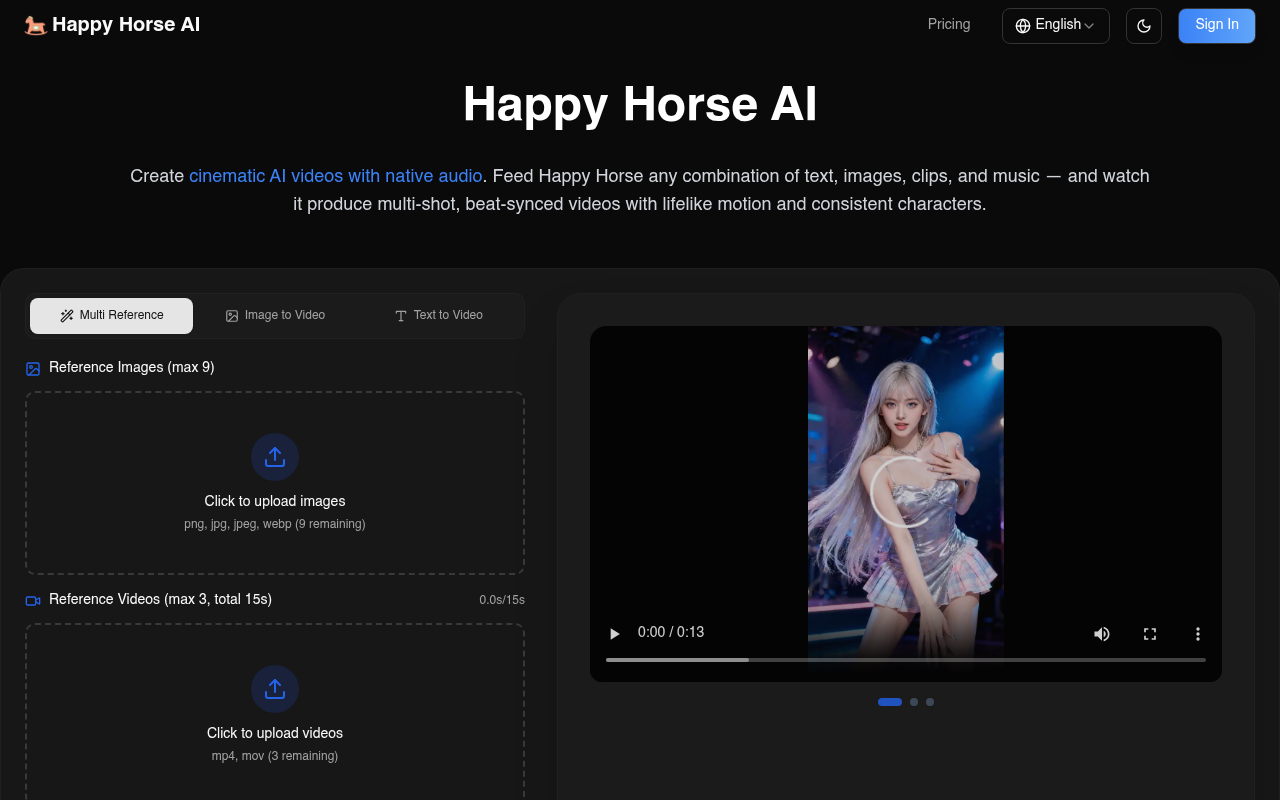
Overview
Happy Horse AI is a multimodal video creation tool that combines text, images, and audio into polished cinematic videos. It helps filmmakers, educators, and marketers produce consistent, high-quality content effortlessly.
Happy Horse AI provides a comprehensive platform for creating cinematic videos by integrating text, images, and audio into a seamless output. It is particularly valuable for filmmakers, educators, and marketers who need to produce engaging, consistent content with minimal effort. The tool stands out for its ability to maintain character consistency across frames, a challenge that often plagues video production efforts.
The pricing model ranges from a free tier with limited credits to a customizable enterprise plan, making it accessible to a wide range of users. While the tool offers significant advantages like native audio generation and advanced camera techniques, new users might find the onboarding process somewhat quick, potentially requiring additional exploration to fully grasp its capabilities.
Overall, Happy Horse AI serves as a versatile solution for those looking to harness AI in video production without needing a full video production crew, offering a balance of features that cater to both casual users and professionals in the field.
Key Features
Multimodal Input
Combine images, clips, and audio for custom videos.
Realistic Motion
Objects interact with lifelike weight and momentum.
Audio Generation
Generates synchronized sound directly with video.
Cinematic Camera
Replicates advanced camera techniques.
Storyboarding
Produces videos with natural cuts and transitions.
Aspect Ratios
Offers various aspect ratios for platform compatibility.
Pricing Freemium
Basic
800 credits/month Happy Horse AI Video Multiple AI video models AI Image Generation Standard generation speed No watermark Private generation Customer support
6 price-matched alternativesPros & Cons
Pros
- Supports multiple input types for rich content creation
- Maintains character and style consistency in videos
- Includes native audio generation synchronized with video
- Replicates advanced cinematographic techniques
- Offers a variety of aspect ratios for different platforms
Cons
- Onboarding process might feel rushed for new users
- Free version has limited credits
- Enterprise pricing requires direct contact for details
Frequently Asked Questions
Do unused credits accumulate?
No, unused credits do not roll over to the next billing cycle. Each month, your credit balance resets.
How do I cancel my subscription?
You can cancel your subscription anytime via the account settings page. Cancellation will stop the next billing cycle.
How can I upgrade my subscription?
Upgrading is easy. Visit the pricing page and select a higher tier plan to access more features.
What refund policy do you have?
Refunds are available under specific conditions outlined in our refund policy. Please review the policy for detailed information.
Can I still use my credits after canceling my subscription?
Yes, you can use any remaining credits until they expire at the end of your billing cycle.
67 Alternatives to Happy Horse AI

AI Fruit
Create AI-generated fruit videos for social media without editing skills.
AI Veo 4
Create videos using images, audio, and text with synchronized dialogue.
AIReel
Transform text and images into videos effortlessly.
CreatorKit
Create AI images and videos effortlessly.
Dehome
Transform your space with AI-generated interior designs.
Kaiber
Explore Video & Image Creativity with KaiberUser Reviews
Be the first to review Happy Horse AI
Please log in to leave a review.