

Zotero
Ein kostenloser Open-Source-Referenzmanager, der Forschungsergebnisse aus Ihrem Browser sammelt, organisiert und zitiert.
Aktualisiert vor 9 Jahren · v5.0

Overview
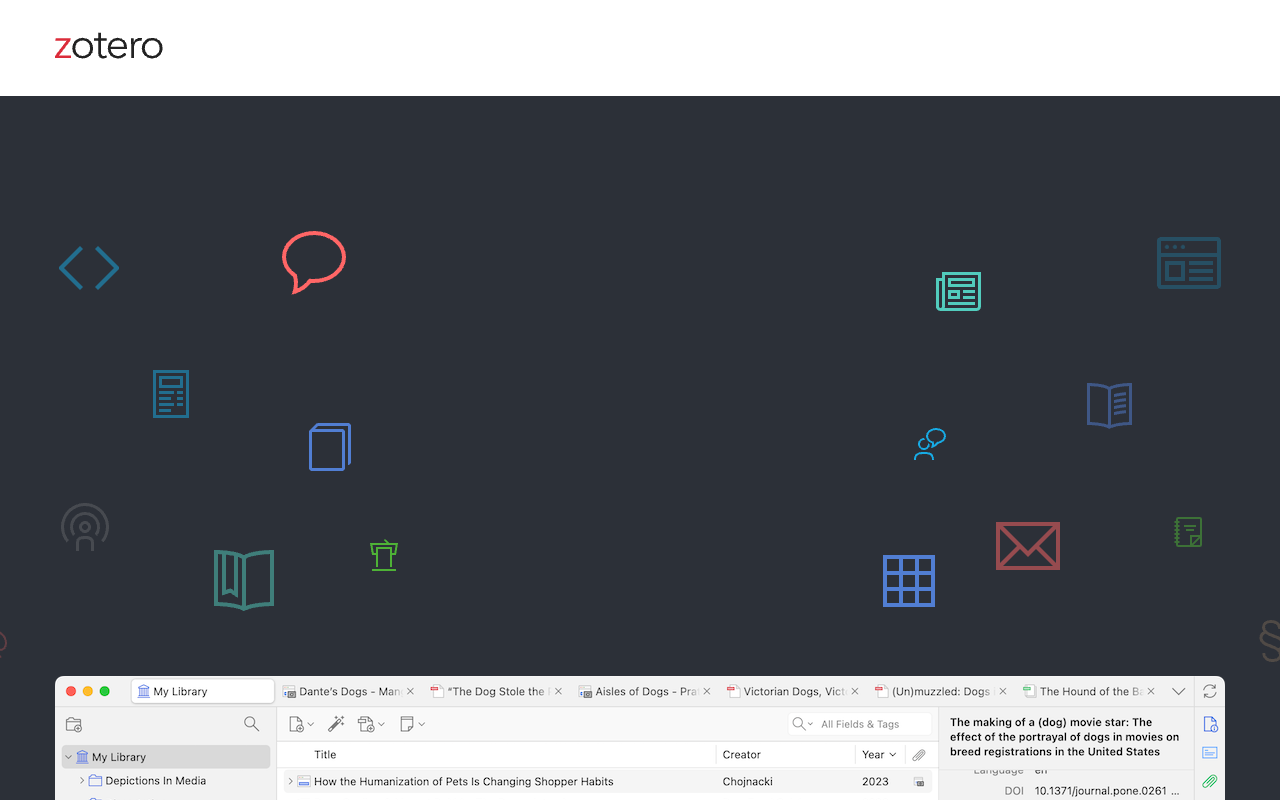
Zotero is a free, open-source reference management tool that helps researchers collect, organize, cite, and share research. It automatically captures citation data from web pages like JSTOR and arXiv, organizes items into collections with tags, and generates bibliographies in over 9,000 citation styles. Students, academics, and independent researchers use it to streamline citation management and collaborate on shared libraries.
Zotero is a reference manager that does exactly what it promises: collect, organize, cite, and share research. It runs on Mac, Windows, Linux, iOS, and Android, and the browser extension works on most academic databases. I tested it on JSTOR, PubMed, and a few random news sites, and it grabbed full citation details every time. The desktop app lets you sort items into collections, tag them with keywords, and create saved searches that automatically fill as you add new materials. It also integrates with Word, Google Docs, and LibreOffice for inserting citations and generating bibliographies on the fly.
The tool is developed by a nonprofit and the code is open source, which means your data stays yours. There is no tracking, no ads, and no push to upgrade. The free tier includes 300 MB of file storage, which is enough for a few dozen PDFs but not much more. Paid plans start at $2.08 per month for 2 GB, which is reasonable compared to proprietary alternatives like EndNote or Mendeley. The biggest limitation is that syncing across devices requires a bit of manual setup, and the interface, while functional, feels dated compared to some newer tools.
Overall, Zotero is a practical, no-nonsense tool for researchers who want to spend less time formatting citations and more time writing. It is not flashy, but it is reliable and backed by a community that keeps it updated. If you need a free citation manager that works offline and respects your privacy, this is the one to use.
Key Features
One-click capture
Automatically detects research items in your browser and saves full citation details with a single click.
Tag and sort
Organize items into custom collections and apply keywords, or create saved searches that auto-populate.
Citation engine
Generates references and bibliographies in over 9,000 citation styles inside Word, Google Docs, and LibreOffice.
Cross-device sync
Optionally syncs your library across devices, keeping files, notes, and metadata consistent everywhere.
Group sharing
Share a library with unlimited collaborators at no cost for co-writing or distributing course materials.
Open source
Developed by a nonprofit with publicly available code, ensuring your data stays private and secure.
Pricing Freemium
Kostenlos
- Unlimited local library
- 300 MB file storage
- Sync across 2 devices
- Unlimited group libraries
2 GB Storage
- 2 GB file storage
- Unlimited device sync
- All free features included
6 GB Storage
- 6 GB file storage
- Unlimited device sync
- All free features included
15 GB Storage
- 15 GB file storage
- Unlimited device sync
- All free features included
30 GB Storage
- 30 GB file storage
- Unlimited device sync
- All free features included
Pros & Cons
Pros
- Free core functionality with no time limits or feature restrictions
- Supports over 9,000 citation styles including APA, MLA, and Chicago
- Browser extension works on most academic databases and news sites
- Open-source code and nonprofit ownership ensure data privacy
- Unlimited group libraries for collaboration at no extra cost
Cons
- Free storage is only 300 MB, which fills up quickly with PDF attachments
- Syncing setup across devices is not intuitive for new users
- Interface feels outdated compared to newer reference managers like Paperpile
Frequently Asked Questions
Is Zotero really free?
Does Zotero work with Google Docs?
Yes, Zotero has a plugin for Google Docs that lets you insert citations and generate a bibliography directly in your document. It also works with Microsoft Word and LibreOffice.
Can I share my Zotero library with others?
Yes, you can create shared group libraries and invite unlimited collaborators. Everyone in the group can add, edit, and organize references. This is free for any number of groups.
What citation styles does Zotero support?
Zotero supports over 9,000 citation styles, including APA, MLA, Chicago, and thousands of journal-specific formats. You can search for and install any style from the Zotero Style Repository.
How do I get started with Zotero?
Download the desktop app for Mac verfügbar, Windows, or Linux from zotero.org, then install the browser connector for Chrome, Firefox, or Safari. The connector automatically detects citations on most academic sites.
Version History
Major rewrite of Zotero with improved performance, new item types, and a redesigned interface.
Introduced Zotero Standalone, a desktop application separate from the Firefox extension, and improved sync capabilities.
Added note-taking features, better PDF management, and enhanced collaboration tools.
Introduced group libraries for collaborative research, tagging, and improved citation formatting.
97 Alternatives to Zotero

KI für akademische Hilfe
AI Essay Writer, Plagiarism Checker & Academic Tools
Aithor
Fortgeschrittener KI-Schreibassistent für akademische Exzellenz
Anara
Anara ist ein KI-Arbeitsraum für Forscher, um zu organisieren und...
Connected Papers
Visual exploration tool that maps related academic papers using citation...
Abmessungen
A linked research database for finding and analyzing publications, grants,...
Elicit
An AI research assistant that searches, summarizes, and organizes academic...Traffic Data
Verkehrsquellen
Top-Länder
 Vereinigte Staaten
23.2%
Vereinigte Staaten
23.2%
 Deutschland
6.5%
Deutschland
6.5%
 Frankreich
5.5%
Frankreich
5.5%
 Indonesien
5.3%
Indonesien
5.3%
 China
5.2%
China
5.2%
Top-Schlüsselwörter
Engagement-Metriken
User Reviews
Be the first to review Zotero
Please anmelden to leave a review.